
The deduction ledger: find, prove and recover retailer deductions
Every short payment is captured from your EDI remittances, checked against the order’s own documents, and turned into a bilingual evidence pack in one click. Here is how it works.
Retailers deduct money from supplier payments every week: late ship notices, shortages, compliance fees, short payments with no reason at all. Most suppliers know some of it is wrong. What stops them from disputing is the work: finding each deduction, digging out the documents that prove it wrong, and writing a claim before the retailer’s deadline. The deduction ledger does that work from the EDI history Weredi already has.
What it does
- NewReads every incoming
820remittance and812debit memo and records each deduction, including payments that are short with no reason given. - NewImports the deduction report from a retailer’s portal (CSV or Excel), and remembers your column mapping for that retailer.
- NewLinks each deduction to the order’s purchase order, ship notices, invoice and acknowledgments, then checks whether the evidence supports a dispute.
- NewBuilds a two-page evidence pack PDF, in French or English, and a dispute letter you can edit.
- NewTracks every claim from new to won, lost or written off, with dispute deadlines and a running total of what you recovered.
1. Every deduction, in one place
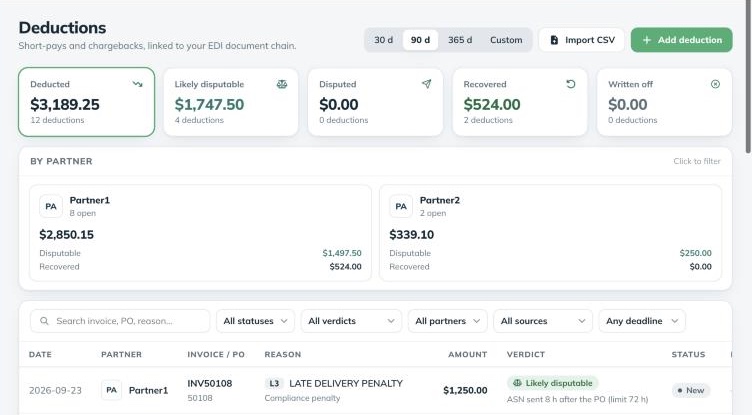
When a retailer pays you by EDI, its 820 lists what it paid for each invoice and what it took off. Weredi reads each adjustment as it arrives, and also catches the quiet ones: an invoice paid for less than it was billed, with no reason code at all. 812 debit memos are captured the same way, and a debit memo and the payment line it explains are kept as one deduction, never counted twice.
Deductions that arrive another way go in too: import the retailer’s portal export, or add one by hand when it comes by email or on a cheque stub.
2. A verdict for each deduction
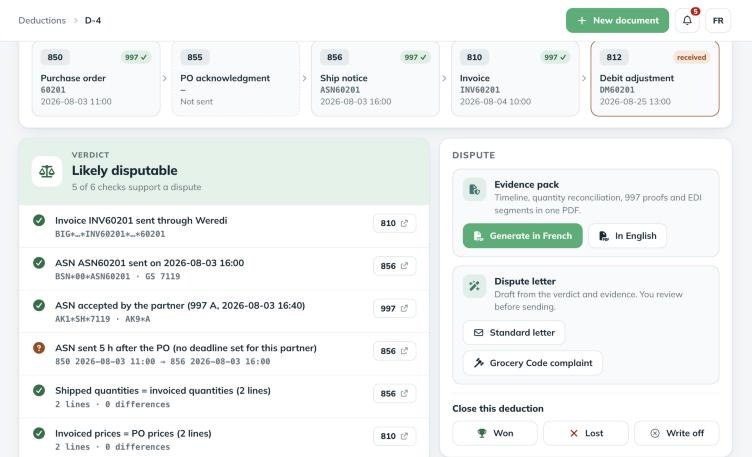
For each deduction, Weredi finds the invoice it reduces and walks the order back to its purchase order, ship notices and acknowledgments. Then it runs the checks that matter for that kind of deduction and tells you how many support a dispute.
| Check | Evidence it uses |
|---|---|
| The invoice exists and was sent | Your 810, matched by invoice number and partner |
| A ship notice was sent | The order’s 856 |
| The partner accepted it | The partner’s 997 for that ship notice |
| It was sent on time | The 856 timestamp against that partner’s ASN deadline |
| Quantities match | Shipped quantities in the 856 against invoiced quantities in the 810 |
| Prices match | Invoiced prices against the purchase order’s prices |
The result is a plain verdict: likely disputable, likely valid or unknown, with each check’s evidence one click away. Reason codes are shown in plain language, in French or English, even when the retailer sends only a code.
3. The evidence pack, in one click
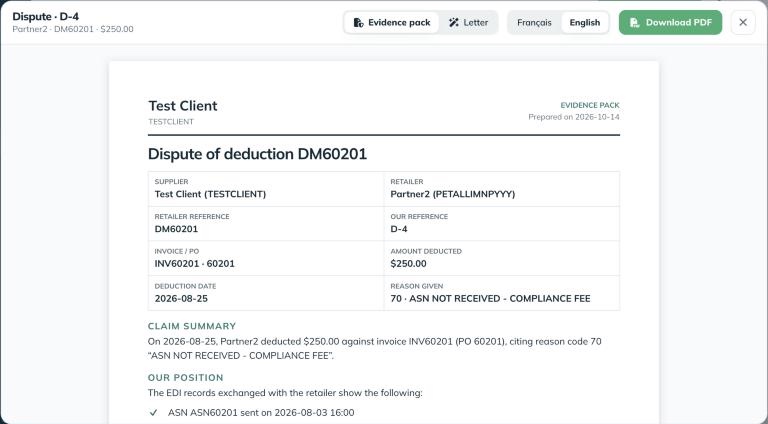
A dispute is won with documents, not arguments. The evidence pack puts them on two pages, generated from your EDI records in French or English:
- The facts: supplier, retailer, references, invoice and PO, amount, date and the reason given.
- Your position: the checks that support the dispute, in plain words.
- The document timeline: every document in the order’s life, with its timestamp and 997 status.
- A quantity reconciliation: ordered, shipped and invoiced, line by line.
- The proof: your partner’s 997 acknowledgments, the relevant EDI segments and the validation results against its guide.
Next to the pack, a dispute letter is drafted from the same verdict, as a standard letter or as a complaint under the Grocery Code of Conduct. Edit it, then download it as Word or PDF.
4. Follow every claim to the end
Each deduction moves through New, Reviewing and Disputed to Won, Lost or Written off. Set a “dispute by” date and the ledger shows what is overdue or due within seven days, with a count in the sidebar. Notes and files, such as the retailer’s reply, stay with the deduction, and closing one as won records the amount recovered, which feeds the totals at the top of the ledger and on each partner’s page.
Retailer portal reports, imported in a minute
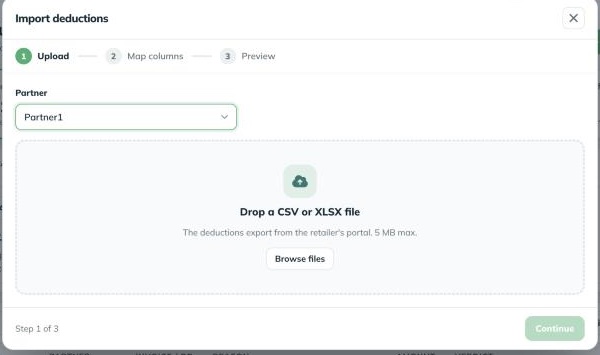
Download the deduction report from the retailer’s portal and drop it in. Weredi guesses which column is which, in English or French, and shows a preview before anything is saved: which rows are linked to an invoice, which are already in the ledger and will be skipped, which are incomplete. Save the mapping for that retailer and the next import is a single step.
Who gets it
Capture runs on every plan, so your deduction history builds up from your first remittance. On the Weredi plan you see how much your partners deducted; the verdicts, evidence packs, letters and tracking are part of Weredi Plus and Enterprise, and of every free trial.
For the method behind a good claim, read building a dispute pack that gets paid.
Questions
Which deductions does Weredi capture automatically?
Every adjustment in an incoming 820 remittance and every debit in an 812, plus invoices paid for less than they were billed with no reason code. Others can be imported from a retailer’s report or added by hand.
Does Weredi file the dispute with the retailer?
No. Weredi prepares the evidence pack and the letter; you submit them through the retailer’s own dispute process, then record the outcome in the ledger.
Can I use it for grocery deductions?
Yes. Letters can be drafted as a complaint under the Grocery Code of Conduct, and the evidence pack works the same for grocery and general merchandise.
Which plans include the deduction ledger?
Weredi Plus and Enterprise, and every free trial. Capture runs on every plan, and the Weredi plan shows your deduction totals.
See what your retailers deducted
Start a 14-day free trial: deductions in your remittances appear in the ledger on their own, with their evidence ready.